
- cross-posted to:
- explainlikeimfive@lemmy.world
You must log in or # to comment.
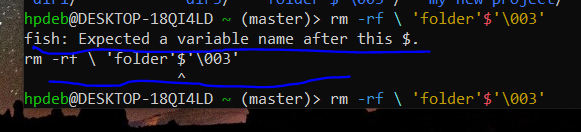
It’s just not escaped properly.
You can probably just get away with putting a backslash
\before theso it looks like\$.Didn’t work.
I’m unfamiliar with fish but that
'\003'also looks a lot like how bash escapes unprintable control characters (ASCII 3 is ‘end of text’ apparently).You probably have sh or bash available. Try the same command in that.
sh -c "rm -rf 'folder'$'\003'"Or just delete all directories that start with folder with confirmation (no
-f):rm -r folder*
Just type
rm -rf fand use tab to auto complete.The quotes and escapes are mangled.
cdinto the directory with the folder to remove, typerm -rf ./then press tab until the folder you’re looking for is autocompleted after the./Doesn’t seem to work.
If you’re struggling, might as well either open a file manager like midnight commander to make your life easier.
What’s that ?
a file manager
Google.
Are you sure the name is
'folder'$'\003'? I think the outer quotes might be added by ls. I would tryrm -rf 'folder\'\$\'\\003'Edit: Or
rm -rf 'folder\'$\'\\003'You probably don’t own the folder. Use sudo.
Meaning ??

It’s right here.
Oh. Sudo is the special word meaning admin. So if you have a command like rm and it fails due to permissions you simply add sudo. sudo rm. But I see that your problem is the folder name. So nevermind. Maybe look at the spaces? Maybe you have tab$tab instead of space$space?