

41·
2 days agoof course we won’t accept vibecoded slop but we’re not against people getting help from LlM
Hm. I wonder what that means. Every AI project says they won’t accept vibecoded slop… and yet…
Install Guix
of course we won’t accept vibecoded slop but we’re not against people getting help from LlM
Hm. I wonder what that means. Every AI project says they won’t accept vibecoded slop… and yet…

I had to redo was my passkeys
phew Glad I don’t use passkeys.

The program has been written with the assistance of AI.

deleted by creator

Risk of Rain 2! Still haven’t beat it…
Thinkpads: So many damn models I’m a bit lost. I know some people love them though.
Good news! I’ve narrowed it down for you: get the Lenovo ThinkPad T14 Gen 7! It’s got a 10/10 repairability score on iFixit: https://www.ifixit.com/Device/Lenovo_ThinkPad_T14_Gen_7
It’s what I’m rockin right now. Running Fedora Silverblue, btw. It’s great. Happy to answer any questions about it.

Yeah, my work is forcing us to use Claude for everything now. More than ever, I’m convinced that using AI is slower and worse than me just doing it by hand.
UNLESS, if I blindly accept the output, then Claude is faster. Sure, I can close the ticket in 15 minutes. Is it right? Idk. Is it good? Idk. Does it have bugs? Idk. Did it make shit up? Idk. Did anything even get compiled or tested? Idk. The ticket is closed though and that’s all that matters, apparently.

Really? I’ll need to pay closer attention next time I go to Target or Office Depot…
Yes… until I started using Fedora Silverblue and now I use software center, but only occasionally because the flatpaks update themselves in the background.
Is Framework still sponsoring this guy? (Yes, gifting hardware counts as sponsoring.)

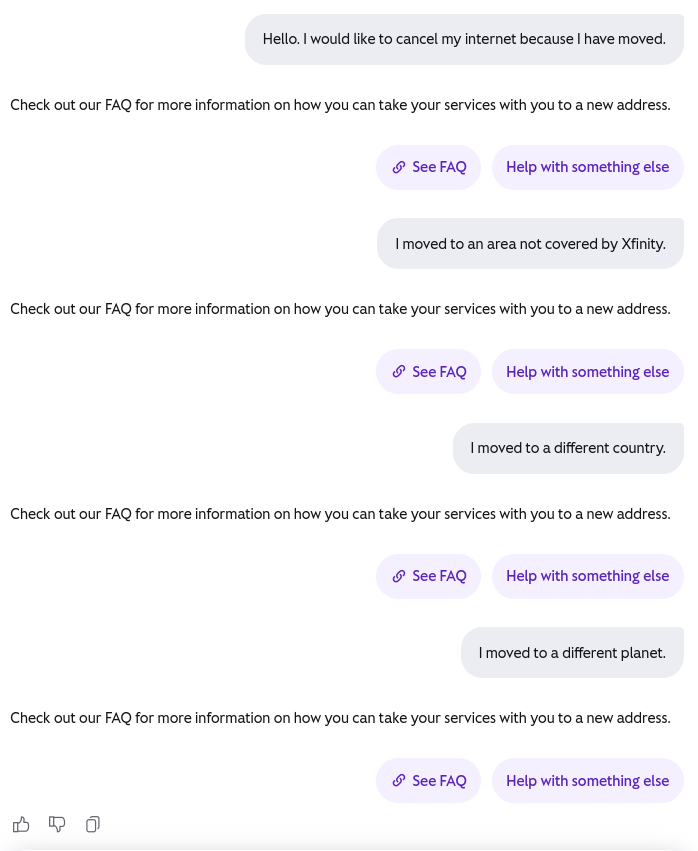
Hahahaha. I actually didn’t check the FAQ… and my intuition was right. This is the link to the FAQ: https://www.xfinity.com/support/articles/now-portal-overview

Ah, then I guess not.
Hm. Not totally sure… I just started messing with this, but…
I think what you could do is connect to the VPN and sync the latest state of the repo, code, issues, patches. Then disconnect from the VPN. Work. View issues, review patches, write code, git push to your local node. Then, when you’re ready, connect to the VPN and sync up with the latest changes.
Or I guess you could use the VPS as a bridge? Install Radicle on the VPS, which is also connected to the VPN? Sync your local node with the VPS node?
Just gotta make sure the repo is set to private so it doesn’t get announced to the whole network. A private repo is invite-only.
Hm… Idk. Again, total Radicle noob here.


I finally learned what a flair is! Thanks!
Here are my old notes: https://lemmy.world/post/35121451
Is there no way to adjust key sensitivity?
I never found away. I think I remember opening a support ticket, but it didn’t go anywhere.
What do you mean with the wrong keycode?
Technically, the keyboard doesn’t have a “Print Screen” key. It has a Sysrq key, which is used for the same purpose, but it’s actually a different keycode. See https://github.com/StarLabsLtd/firmware/issues/28 Maybe Cheatsheet programme could help?
What do you mean with the LEDs from the laptop?
So above the function keys, but below where the screen actually starts, there are some LEDs. lol. I just checked and realized they conveniently edited out those LEDs from promotional material. Above the F2 and F3 keys there are BRIGHT LEDs that used for different statuses. There are also some LEDs on the side that turn on when the laptop is charging, which are also SUPER bright. I would normally toss a shirt on top of the laptop so I could charge it at night and not be bothered.
I bought the Starbook Mk VII Ultra in 2025.
I… would definitely not recommend it. I already sold it. The build quality is mostly pretty nice, but everything else is not great.
ctrl-v not ctrl-vv.Next time I get a laptop I’ll probably try a Tuxedo laptop.
(I ended up trading the Starlabs for a Lenovo T14 Gen 7, which works well with Linux, but doesn’t meet your criteria.)
Looks - I like the Macbook touch and feel
I would just like to caution you about wanting to maintain the Apple taste, but runs Linux. You may have to adjust your taste preference if you want a laptop that runs Linux well.
















I pre-ordered one. Will report back.