Jellyfin does not.
Setting up Jellyfin to be accessible outside of my home network has been a huge pain in the ass.
Not Jellyfin’s fault tho. I wish there was an easier way
I use tailscale and NPM to reverse proxy.
When I want to watch, I turn on the VPN and go to the app. Easy peazy
Tailscale could probably be easier but I wanted to make it easy for my parents.
I was trying to set it up via Reverse Proxy in Caddy. My stupid NAS has proprietary software and the only way to do it is in Docker but their version of docker has some wonky issues with ports.
Oh, I use caddy too. What gave you trouble?
It’s been a few weeks since I’ve tinkered with it but I plan on pulling it up today. If I remember right, it works fine if I launch it as a singular container by itself, but if I launch it inside a container with multiple apps, it says the ports are in use. I verified that no other app is using the ports. I checked in the CLI and it says containers is using the port. Very weird.
Following tutorials and researching online had been helpful by my NAS uses QNAP’s QTS operating system. It locks you out of many basic functions. I can’t install apps outside of its App Store unless it’s in a docker container, for example.
Many command line functions have also been removed so when I’m troubleshooting or looking for alternate fixes, I’m blocked out.
You nas doesn’t support docker compose? Its kind of the only reason why you’d want to have several processes on the same container.
Ps.: can you ssh in?
I can use docker compose. I need them on the same container so they can see the other apps exist and direct traffic there. Or that I as my understanding.
I tried setting up Caddy on a separate container as Jellyfin but that didn’t work.
It’s not easy trying to set up VPN or a reverse proxy, dynamic DNS and so on if you want secure access for more than yourself l, that is true. I hope they can figure out a way to make that process a lot easier.
Actually, using an LLM to walk you through the process of setting up jellyfin inside a docker container (and setting up the arr stack) and all of that makes things a lot easier than trying to figure it all out on your own.
Have to agree. I hate LLM but this is a good use for it.
Happy cake day! Thanks for the info!
That was a big reason I went with Emby. Not open source, but wasn’t necessary to me, and I wanted a cloud connect function that it handled well. And not all devices have a Jellyfin app that’s easy to install. My TV would require it to be rooted.
I don’t mind paying a seedbox company to provide me with a box with qbittorrent and emby and other stuff I don’t use
Fair, but self hosting stuff has that part of self. It is difficult to make it easy for everyone since everyone has a different setup, as such it is mostly directed towards people who are expert in doing this kinds of things or who will dedicate the time to learn how to do it.
The good thing is after you spent a couple days trying to figure out how to make it work, it will work in the future and you already know how to setup more stuff.
I actually love when I run into an issue like that get an error. Researching that stuff is fun for me, but I think trying to get the average person to do it is a non-starter
It’s not directed towards people who are experts. I’m an expert and can’t secure Jellyfin properly because Jellyfin doesn’t support proper secure authentication.
Which authentication method are you wanting for it? I wouldn’t call myself an expert but my job stuck senior in front of my title a few years back.
Native OIDC/SSO support, allowing users to offload the authentication to a purpose built software.
Then don’t and do VPN?
I would rather just properly secure it like every other selfhosted service I have, and not have to manage a VPN client for every user who wants to connect to Jellyfin.
A security focused service vs a media consumption service competing for max security…
I wonder what would be the most successful at this task…
A security focused authentication service would be the most successful, straightforward, and simple to implement solution.
Unfortunately Jellyfin, nearly alone amongst its FOSS peers has not implemented support for these services. It’s the only one of my many dozens of selfhosted services that I can’t properly secure.
It is Jellyfins fault and there is an easier way, the Jellyfin team just hasn’t prioritized it.
Yeah but good luck building out homelab these days. Too expensive
Bro win 10 computers are essentially free thanks to microsoft’s windows 11 requirements and any of them can keep up with transcoding. Add onto that any second hand sata drives and a sata controller than handles multiple parity drives for raid 5 and you’ve got a solution that is under the yearly subscription fee of ad-free netflix and a fun weekend project.
Can you guide my grandma to help her set it up? I’ll give you her number.
Edit: Just want to say I appreciate the info still
not the issue, storage price is
stremio/nuvio + torbox since yall keep mentioning not storing anything longterm and deleting as you go
Hence my solution. You can get 2-4 TB drives for around $30 on ebay. Get a flexible RAID controller that can handle multi-parity Raid 50, ideally a second hand raid card. We’re at a total of $230 in at this point, assuming you have a windows 10 desktop lying around.
This is not a high data speed situation. If you have 6 or more drives you can dedicate two to parity and now you will never have data loss despite buying second hand drives. Effective storage capacity will be 16TB, which is more than enough to store 100 full series and a few thousand movies at 1080p or lower, and raid 50 gives a speed boost above what your controller will likely be able to handle, and way above what is needed for even a quite large multi-user media server.
Data storage is still incredibly cheap. You’re just confusing your needs and your wants.
Where? I am not seeing any computers worth grabbing, even though I keep hearing people are dumping win 10 computers everywhere.
They are going to salvage… We (the MSP I work at) constantly throw out older systems. Too bad they have SSDs with data of potential clients and thus need to be destroyed according to GDPR…
I have seen a few pallet auctions (lots of 100 or more) but they are not going cheap.
This too :(
Too bad that high capacity HDDs and SSDs went through the roof.
Not like you can have a big library with 5x 2TB HDDs if you arent willing to sacrifice quality/bitrate. Simply not feasible.
Cheaper than a netflix subscription. Especially if you repurpose the last PC you upgraded as a server. Jellyfin will run fine on 15 year old hardware.
If you’re happy with FHD (1080p) res, the requirements for both server and client are very low.
So long as you don’t need to stockpile old shows you never watch, you can get by on an old laptop and possibly an external drive.
My homelab started out on a Raspberry Pi 2b. Most of the hardware Ive brought online were dumpster specials someone else didn’t want. It can be done on the cheap. Won’t necessarily be reliable, but it can be done cheap.
you don’t need to stockpile old shows you never watch
c/datahoarders feeling personally attacked
:-D
I’m in no position to toss to much shade at the data hoarder community. I’m personally sitting on close to 64TB of media I’ve collected over the years. In my case, most of it legitimately acquired, either by myself or by family, but still. It adds up and most of it hasn’t been accessed more than once or twice.
Where the fun in not hoarding old childhood shows and movies ;)
Jellyfin isn’t too demanding. I’m still running my whole media stack on a Raspberry Pi 4.
This can work fine if you’re just a single user/household since you can ensure that you’re only acquiring audio/video codecs that will play without transcoding but gets more challenging if you’re also sharing remotely with others since you don’t necessarily know what devices they’re using to watch which may require transcoding.
My wife is slowly getting used to Jellyfin. We’ve already cancelled Amazon. More to follow.
Wife Acceptance Factor is key for these things. It was a chore to make mine understand why I was eliminating Netflix, Amazon, Spotify, etc., and have her start using my self-hosted services. Took le about a year, but now she loves just firing up FOSS apps and they just work. She does bug me every now and then about the UI on some of the apps, but nothing that will requires attorneys to get involved.
Agree a combo of stremio and jellyfin for me, just for a backup. I pay for VPN and a debrid service. I generally browse and watch disposable content on stremio, but also like jellyfin picking up my regular tv shows and my repeat/keeping content.
qBittorrent does not.
Emby doesnt
does it run in docker and with a vpn like proton, which i not using? i dont wanna fire up nord again. been using transmission in an old container!
gluetun (a container) enables you to put every sort of container behind it to act as a kill switch.
If you have a .conf or .ovpn file, you can plug it in there.
But they also support many providers nativelyYes, example: https://hub.docker.com/r/dyonr/qbittorrentvpn
tbh I would just combo a compose with a seperate qbittorrent and vpn container on the same pod.
That way you can set proper iptable rules if needed and perma bind qbittorrent to the vpn interface.
Ceo be like: “Hey, everyones leaving. We should milk more data from the idiots who stayed.”
Geez, I wonder why I’m running my own jellyfin library
By now the number of titles would rival a small Netflix and I’m growing
Ive got Plex and im sitting on about 40tb of Films and TV shows. I got in early with the perpetual licence a few years back.
Stremio. And everything can be 4k hdr10
Also Nuvio, a fork of Stremio that seems to modernize the interface a bit more.
Yeah, Stremio + SmartTube + CloudStream + my deGoogled Onn 4k TV Box rules.
Smarttube…is a hero!
How do you deGoogle an Onn box/device?
Thanks. From what I gather, you still need to connect a Google account to it though. Is that correct or did I miss something?
https://www.reddit.com/r/AndroidTV/comments/13xwvwi/new_box_setup_onn_google_account_required/
https://www.reddit.com/r/OnnStreamingTV/comments/1au9leg/setup_onn_4k_box_without_gmail_address_use/
https://androidtvnews.com/android-tv-without-google-account/
There are workarounds. If it does require a Google account, set one up with fake info, then delete it once getting past the initial setup screen.
Did the fake info, but it’s impossible to remove the Google account, it seems. It only allows you to switch to another Google account. But not remove entirely.
Hm, weird. I was able to remove my temp Google account from the OS.
What is that, it just links out to other platforms where it is hosted?
By default, yes, to avoid legal problems, but there are a lot of pirate plugins
And you can use it legally too… It just integrates a lot. Basically, what Plex should have been…
The only bad thing is it can’t run in offline mode I found
Kinda. Mostly used as an interface for piracy torrent trackers like realdebrid or torbox rather than people hooking it up to regular streaming platforms though.
Real-Debrid started blocking content, so I’ve been testing Torbox instead and it seems to be working better.
What content is RD blocking and how could you tell?
Real-Debrid and a couple other Debrid providers are now actively complying with DMCA takedown requests, so lots of content will simply say that it was taken down due to such a request. Here’s what appears if you find something that’s impacted:

Thanks for the heads up! I haven’t come across this yet but maybe it’s time for me to switch from RD when my current subscription is up
As I was running multiple Real-Debrid accounts for relatives, a side benefit of switching was that Torbox and Premiumize allow simultaneous connections, removing the need for multiple accounts. Went with the basic Torbox account as a test, but if there’s anything I can’t find I might get the higher one for the convenience of usenet access. 🤔
Any guides on this, I have been off the high seas for years. I used to use rargb and torlock for manually downloading torrents. No idea how these plugins ad such work
Here’s a comprehensive guide. It’s a bit wordy, so if there’s anything confusing about it I’d be glad to help clarify. 👍
I have stemio installed on a few devices. Mostly tv boxes and i have installed it on firesticks for my fam members. You can install it on your laptop etc.
-
YFrom your preferred device download the stremio app (on firestick/tv boxes you need to get the downloader app first…there are plenty of guides).
-
Once you have the app installed set up a stremio account via here https://www.stremio.com/
-
Sign into your app using those login details.
-
You will see something like this. As you scroll down you will see lists of libraries such as ‘public domain’ content or ‘popular’ these can be altered in the addons (left menu)
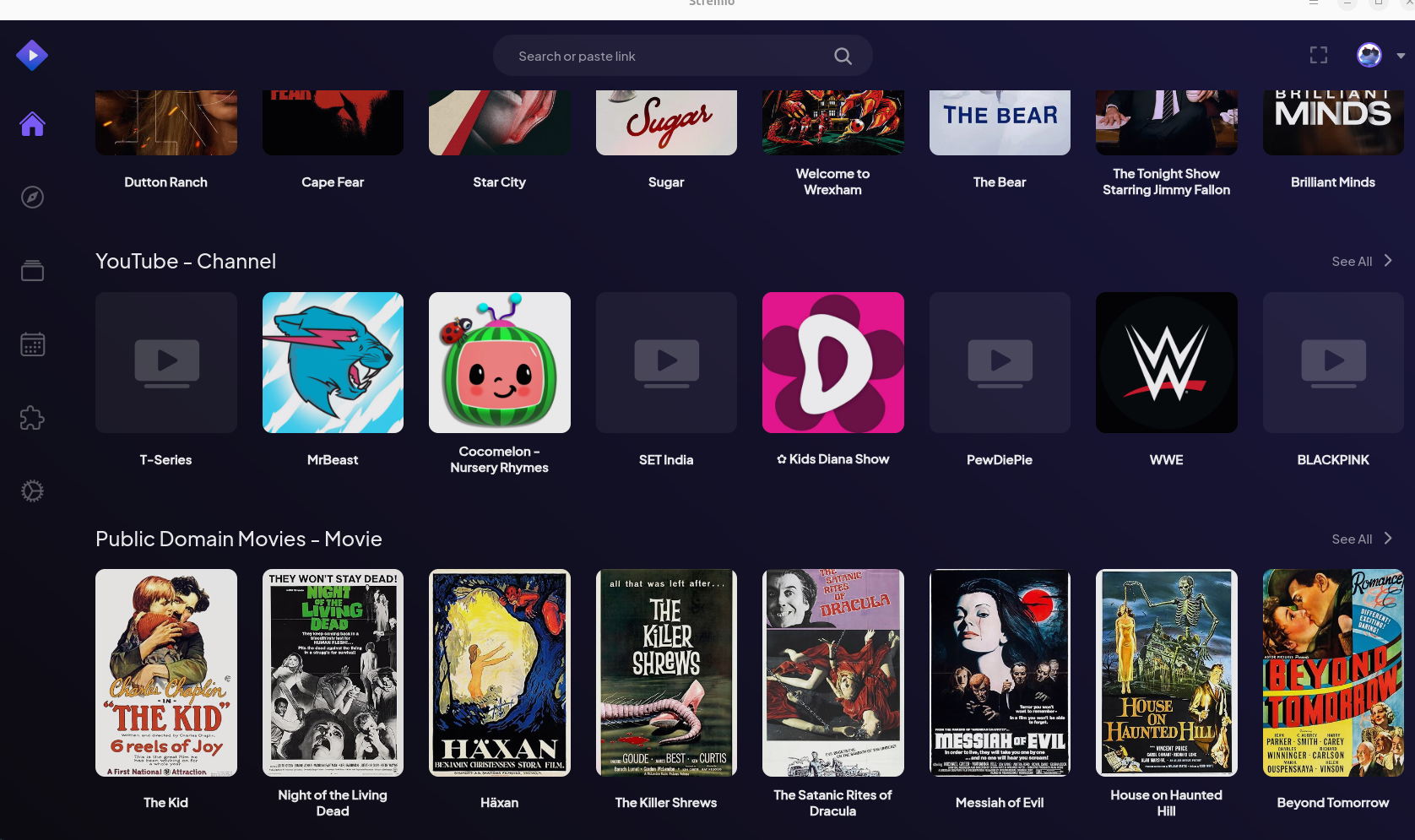
- Configure or add the addons. I delete a lot of the general stuff like YT and choose which libraries i wanna see in there for example i have common libraries using the stremio-netflix-catalog-addon you may have to use a serch engine to find that or it may be a community addon. Green cog is to configure.

It will take you out of stremio to a browser site for you to configure (pick what lists you want) If you like to use vpn etc you can add them here too. Make sure to choose the install addon to activate it in your stremio app.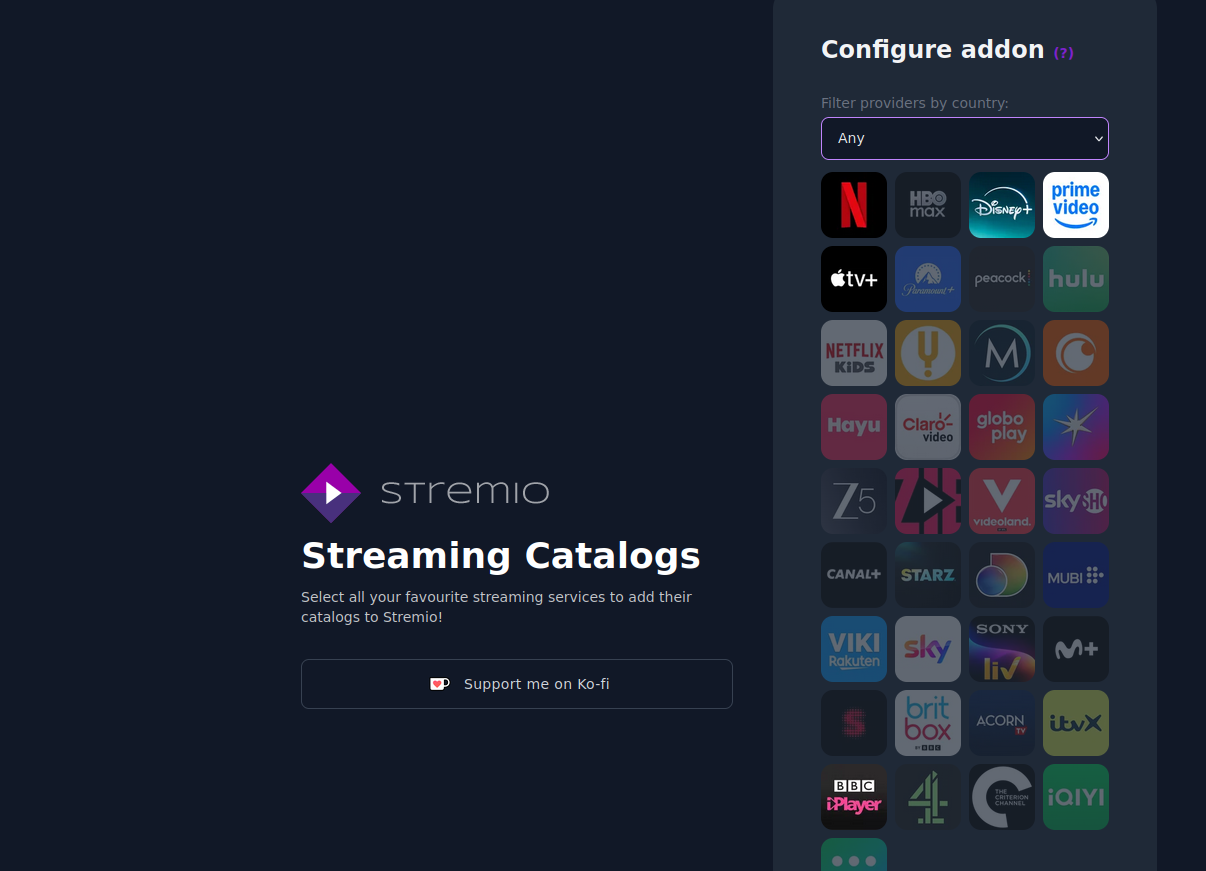
- When you go back to stremio you will see your chosen libraries to browse media. when coosing a movie or sow for example you it will give you some sources. Where the media files come from is down to you based on where you source…there are more addons for this too. The sources you pick that’s your business but its always good to consider a VPN and tor service which work with most addons. Stemio allows you to source your files from your netflix account too.
Debrid services are generally cheaper than VPN services and effectively serve the same purpose by making it so the user isn’t torrenting content, while having a backup of the data saved to the Debrid cache in case there aren’t enough seeders at any given moment.
Which VPN is best for this use case? I tried SurfShark but it keeps blocking the torrent streams which doesn’t make sense to me.
I wanted to do Stremio + TorBox + SurfShark. Afaik that’s the only thing that’s needed?
-
I do wish they had profiles though, and a queue separate from the library for that matter
Stremio is enshitifying. Profiles were a long asked feature and they are implementing that in a paid Stremio subscription.
So you either suck it up and pay or hope that alternatives like Nuvio, Aurora and RealStream gain more traction and support.
This
I wouldn’t even have a problem for paying for Netflix honestly, if the base plan was 4k.
But it’s not.
I can’t even watch 4k with a 4k subscription because they don’t allow that on the desktop.
But pirates don’t care and I can enjoy the show like it was meant to be.
I wouldn’t have a problem paying for it if they were making good content consistently. I think KPop Demon Hunters and Stranger Things are the only things I’ve watched on there since Marvel took their ball.
The other issue i had honestly, is that the last few things i watched on there, turned out was from Australian TV anyway lol (like Rake, utopia).
You don’t need to say “this”. It adds nothing. Just upvote and move on
This.
Come to my jellyfish instance. The only thing I want you tied to is to my bedroom
Giggity.
Have you tried the new rewrite of jellyfin?
They sunsetted the current release version entirely.
I have not heard about that. I’ll have to look into that after work.
Nope, I rarely do upgrades tbh.
Oh well, I hope gosuckadick2@proton.com and gosuckadick3@proton.com aren’t taken yet…
Yep. Aliases all the way down.
Its just a nuisance, I can sign up for tons of free email. What does this really accomplish?
The move is anti privacy. I bet they will only accept kyc emails. Like Google and Microsoft, which nowadays demand proof of ID in surreptitious ways. I have met already several big tech services that refuse emails from alternative providers.
How? Every email now requires a phone number, which I don’t want linked. Every account someone who isn’t me makes gets immediately frozen because they are on some dubious blacklist.
Where is this “free email” you are talking about.
deleted by creator
Exactly. I’ve had my own domains since 1996.
“Share your passwords, we don’t care.”
My wife gives me shit for downloading stuff from Netflix…This shit is why.
What do you
Jeanmean by downloading things from Netflix? How do you do that? Asking for a friendFirst it’s about having it available when Netflix inevitably decides they’re not going to license it anymore… But for Netflix originals, it’s so my extended family can enjoy the good stuff without having to pay Netflix their stupid rates… especially now that I’m not allowed to share my netflix password with family (which used to be encouraged)
I don’t download directly from Netflix, though I understand it’s possible, but I find stuff on Netflix I like and then go dig up the torrent… Someone else has always pre-done the heavy lifting for me. :)
The garbage took itself out. Much appreciated.
Not a problem. I dumped Netflix a long time ago.
On iPhone, I can set it to an email alias and deactivate the alias. If they say they need to email me, I can reactivate it.
Not sure how easy email aliases are on other platforms. I don’t imagine it’s a big challenge for anybody.